What Is RAG and Why Does It Matter for Your Business?

TL;DR / Summary
RAG helps businesses connect AI to their private, up-to-date data to deliver more relevant, contextual answers. This blog explains how RAG works, how it differs from fine-tuning, and where businesses can use it. It also covers key limitations, security considerations, and steps for implementing RAG successfully.
Table of Contents
- Why Standard AI Breaks When Handling Internal Business Data
- Why Do Businesses Need RAG?
- RAG Helps With Company-Specific Information
- RAG Can Work With Changing Information
- RAG Makes Business Knowledge Easier to Access
- How Does RAG Work?
- 1. Prepare and Index Data
- 2. Process the User Query
- 3. Retrieve Relevant Information
- 4. Rerank the Results
- 5. Generate the Response
- RAG vs. Fine-Tuning: What's the Difference?
- When Should a Business Use RAG?
- What Are the Business Use Cases for RAG?
- 1. Internal Knowledge Assistants
- 2. Customer Support
- 3. Product Documentation
- 4. Sales Enablement
- 5. Business Operations
- What Are the Limitations of RAG?
- 1. Poor Data Quality
- 2. Poor Retrieval
- 3. Security and Permissions
- 4. Cost and Latency
- 5. Hallucinations
- How to Implement RAG in Your Business
- 1. Define the Workflow
- 2. Audit Your Data
- 3. Design the Retrieval Layer
- 4. Connect the LLM
- 5. Build Security Into the Architecture
- 6. Evaluate and Monitor
- FAQs
- 1. What is RAG in simple terms?
- 2. Is RAG better than fine-tuning an AI model?
- 3. Does RAG keep my business data private?
- 4. What types of data can I connect to a RAG system?
- 5. How long does it take to deploy a RAG system for business?
- Final Takeaway
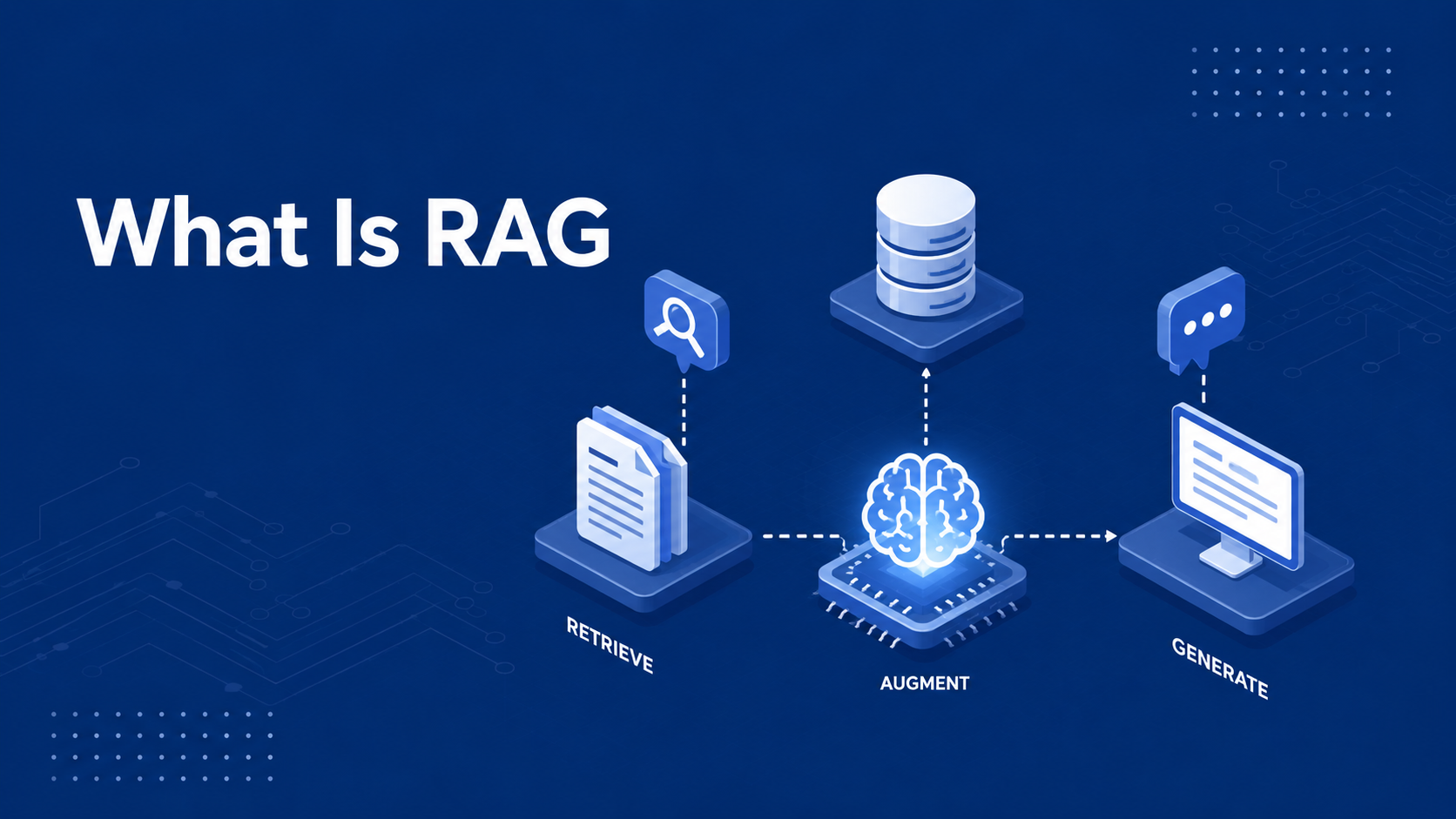
Retrieval-Augmented Generation (RAG) is an artificial intelligence architecture that connects Large Language Models (LLMs) to your company’s internal databases, documents, and real-time operational systems. Instead of relying solely on generic training data, RAG first retrieves your specific business information, then feeds it to the AI model to generate accurate, contextual answers.
If your team has ever tried using public AI models for internal tasks, you have likely hit a hard wall. The AI generates convincing answers that are completely wrong. Or worse, it leaks private information into a public model.
Standard AI tools do not know your internal business rules, your inventory, or your customer history. RAG changes that by linking raw AI power directly to your private company data without requiring expensive, custom model retraining.
Why Standard AI Breaks When Handling Internal Business Data
Most off-the-shelf AI models fail in business environments because they operate on static, public data. Large language models (LLMs) are trained on vast datasets from the internet. They excel at writing copy, formatting code, or summarizing public text. However, they lack access to your company's proprietary knowledge base, recent transactions, and internal workflows.
When forced to answer questions about your specific business operations, standard models encounter three critical breakdown points:
Hallucinations: When an LLM lacks actual factual context, it generates plausible-sounding text that is factually incorrect. In an enterprise setting, an AI hallucinating policy details, product specs, or legal terms creates immediate operational risk.
Stale Information: Retraining a foundational AI model requires millions of dollars and months of compute time. As a result, standard models cannot reference inventory levels updated ten minutes ago or customer records updated yesterday.
Lack of Data Privacy: Feeding internal company documents into public AI tools can expose proprietary IP, operational records, or customer data to third-party model trainers.
Why Do Businesses Need RAG?
Businesses already have valuable information across different systems, but finding and using that information can be difficult.
It may be stored in:
Internal documents
Product manuals
Knowledge bases
CRM and ERP systems
FAQs
Support tickets
Databases
Internal wikis
A general-purpose LLM does not automatically have access to this information.
RAG provides a way to connect AI applications with approved business knowledge.
RAG Helps With Company-Specific Information
An AI model may understand your industry, but it does not automatically know your internal policies, products, processes, or customer information.
RAG can retrieve this information when it is needed.
RAG Can Work With Changing Information
Business information changes regularly. Products are updated, policies change, and new documents are created.
With RAG, the external knowledge source can be updated without retraining the language model every time a document changes.
RAG Makes Business Knowledge Easier to Access
Employees may spend significant time searching through documents and different systems to find an answer.
A RAG-powered assistant can provide a natural-language interface for retrieving relevant information from approved sources.
How Does RAG Work?
A basic RAG workflow can be summarized as:
Prepare Data → Retrieve Relevant Information → Generate a Response
A production system may also include reranking, filtering, access controls, evaluation, and monitoring.
1. Prepare and Index Data
Business information is collected and processed for retrieval.
Documents are often divided into smaller sections called chunks. These chunks can be converted into embeddings—numerical representations that help the system identify information with similar meaning.
The processed information can then be stored in a vector database or another retrieval system.
2. Process the User Query
When a user asks a question, the system processes the query so it can search the available information.
For example:
“How can an enterprise customer request a refund?”
3. Retrieve Relevant Information
The retrieval layer searches the available data and finds information related to the query.
Depending on the application, it may use:
Vector search
Keyword search
Hybrid search
Metadata filtering
4. Rerank the Results
More advanced RAG systems may rerank retrieved results to prioritize the information most relevant to the user's question.
5. Generate the Response
The retrieved information is passed to the LLM along with the user's question.
The model uses this context to generate the response.
The simplified workflow is:
User Query → Retrieval → Relevant Context → LLM → Answer
RAG can help ground responses in business information, but it does not guarantee perfect accuracy. Source quality, retrieval quality, model behavior, and system design all matter.
RAG vs. Fine-Tuning: What's the Difference?
RAG and fine-tuning solve different problems.
RAG gives a model access to external information. Fine-tuning adapts a model's behavior using additional training.
Factor | RAG | Fine-Tuning |
Main purpose | Retrieve external information | Adapt model behavior |
Changing information | Easier to update | Requires additional training |
Private business knowledge | Strong fit | Not the primary purpose |
Custom tone or style | Limited | Strong fit |
Source retrieval | Yes | No |
Typical use | Knowledge-based applications | Specialized tasks and behavior |
If your business needs AI to answer questions using frequently changing internal information, RAG may be a strong fit. If you need a model to consistently follow a particular style, format, or specialized behavior, fine-tuning may be more appropriate.
When Should a Business Use RAG?
RAG is not the right solution for every AI application.
It can be a good fit when:
AI needs access to proprietary business information.
Business information changes frequently.
Employees spend too much time searching documents.
Customers need answers based on company or product information.
Information exists across multiple sources.
Different users need different levels of access.
RAG may not be necessary when the application only needs general knowledge, the information is small and static, or the main requirement is changing the model's tone or behavior.
What Are the Business Use Cases for RAG?
1. Internal Knowledge Assistants
Employees can ask questions about company policies, SOPs, product information, or internal documentation instead of manually searching through multiple sources.
For example:
“What is the process for handling an enterprise customer escalation?”
The RAG system can retrieve the relevant information and provide it to the AI model.
2. Customer Support
Support teams often work with product documentation, FAQs, troubleshooting guides, and policies.
A RAG-powered assistant can retrieve relevant information before generating a response, helping teams find information faster and provide more consistent answers.
3. Product Documentation
Businesses with large documentation libraries can use RAG to build AI-powered product assistants.
Users can ask questions in natural language rather than searching through multiple documentation pages.
4. Sales Enablement
Sales teams can use RAG to retrieve relevant product information, case studies, service documentation, and approved messaging when preparing proposals or responding to customer questions.
5. Business Operations
Operational information is often spread across documents, spreadsheets, and business systems.
A RAG-powered assistant can provide a natural-language interface for retrieving information from approved sources.
What Are the Limitations of RAG?
RAG is powerful, but it is not a magic solution.
1. Poor Data Quality
If source information is outdated or inaccurate, the system may retrieve information that is not useful.
2. Poor Retrieval
The correct information may exist but still fail to appear in the retrieved results because of poor chunking, search configuration, embeddings, or query handling.
3. Security and Permissions
Connecting AI to private business information requires appropriate authentication, authorization, and access controls.
Users should only retrieve information they are permitted to access.
4. Cost and Latency
RAG can involve multiple processing steps, including retrieval, filtering, reranking, and generation. These can affect response time and infrastructure costs.
5. Hallucinations
RAG can reduce the risk of unsupported responses, but it does not eliminate hallucinations. The model can still misunderstand retrieved information or generate unsupported content.
How to Implement RAG in Your Business
A successful RAG implementation should start with the business problem, not the technology.
1. Define the Workflow
Identify who will use the system, what questions they will ask, what information they need, and what success looks like.
2. Audit Your Data
Identify the documents, databases, CRM systems, knowledge bases, or APIs required for the use case. Determine which sources are authoritative.
3. Design the Retrieval Layer
Choose the appropriate retrieval approach, such as vector search, keyword search, hybrid search, metadata filtering, or reranking.
4. Connect the LLM
Pass the retrieved information to the language model along with the user's question. Define how the model should respond when sufficient information is not available.
5. Build Security Into the Architecture
Consider user roles, permissions, authentication, authorization, and sensitive information before connecting business data to the application.
6. Evaluate and Monitor
Test the system with real-world questions and measure retrieval relevance, answer quality, groundedness, response time, and cost.
After deployment, continue monitoring the system as your business data and requirements change
FAQs
1. What is RAG in simple terms?
RAG stands for Retrieval-Augmented Generation. It is a system that allows AI models to search your private company files to answer questions accurately instead of guessing.
2. Is RAG better than fine-tuning an AI model?
For facts, internal search, and live operational data, RAG is much better than fine-tuning. It costs less, updates instantly when files change, and gives accurate source citations. Fine-tuning is primarily used to adjust the tone or coding style of a model.
3. Does RAG keep my business data private?
Yes. RAG systems store your files inside your own private vector database. Your internal company data is not used to train public AI models.
4. What types of data can I connect to a RAG system?
You can connect unstructured files like PDFs, Word docs, and support tickets, as well as structured data from SQL databases, CRMs, and ERP systems.
5. How long does it take to deploy a RAG system for business?
A focused RAG proof-of-concept typically takes two to four weeks. Scaling a full production system across multiple internal databases usually takes six to eight weeks.
Final Takeaway
RAG gives businesses a practical way to connect AI applications with company-specific and frequently changing information.
Instead of expecting an LLM to know everything about your business, RAG allows the application to retrieve relevant information from approved sources and provide it as context for the model.
But successful RAG requires more than connecting a language model to a vector database.
Businesses also need to consider data quality, retrieval, security, permissions, cost, evaluation, and monitoring.
The best approach is to start with a specific business workflow, prove the value, and then scale what works.
Related Blogs & Articles
Your Product Could Be the
Next Case Study
Explore what we’ve built — and let’s collaborate to create something impactful for your business.
We reply within 24 business hours.