
How to Open JSON Files: A Step-by-Step Guide

Written by
Netizens
Modern computing is full of JSON (JavaScript Object Notation) files. They are easy to read, lightweight, and widely used in configuration settings as well as exchanging API data. However, if you’ve ever come across a .json file and wondered how to open JSON file formats to see what’s inside, you’re not alone.
Whether you’re a beginner or simply need a quick refresher, this guide will walk you step-by-step through several ways of opening and reading JSON files. We’ll cover simple tools such as text editors, web browsers, and online viewers, along with more advanced programmatic methods used by developers.
By the end, you’ll know exactly how to open JSON file data quickly and efficiently, no matter which tool you prefer.
Let’s dive in!
Method 1: Using a Text Editor
A simple text editor is the simplest to use for opening a JSON file. The majority of operating systems have one of them installed by default, though to improve functionality, such as syntax highlighting, use a code editor, such as Visual Studio Code (VS Code).
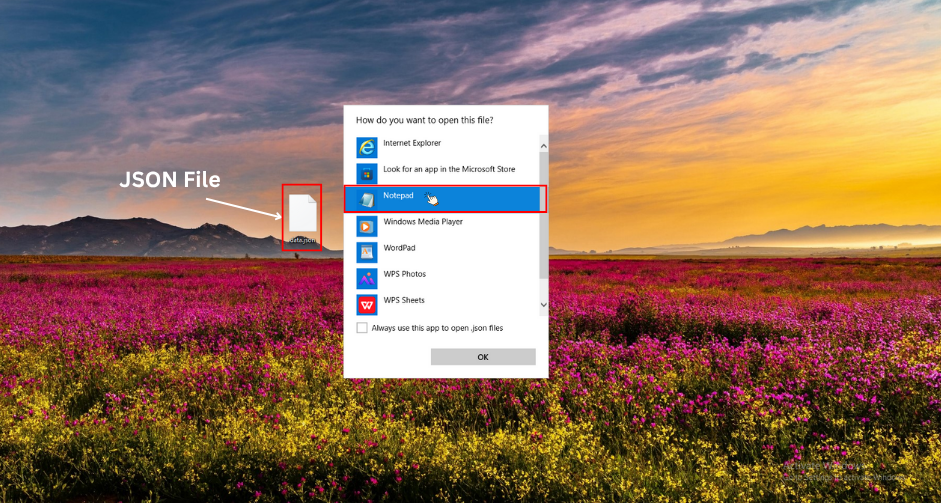
- Find your JSON file: Find the.json file on your computer using File Explorer (Windows), Finder (macOS), or your file manager.
- Open with a text editor:
- On Windows: Right-click the file, Open with, Notepad (Notepad++ in case installed).
- In macOS: Right-click > Open with > TextEdit.
- VS Code: Clicking on it will open the file in Visual Studio Code. If necessary, download VS Code on the official Microsoft site–that is free!
- Edit and view: The contents of the file will be in the form of structured text. VS Code will provide automatic formatting, collapsible sections, and highlighting of errors when the JSON is not, however.
It is an excellent way to perform a fast edit or check without additional software.
Method 2: Using a Web Browser
When you have a small file of JSON, and need a quick look at it, the modern browsers can request it and may display it in a readable format without extensions–though not in a pretty form.
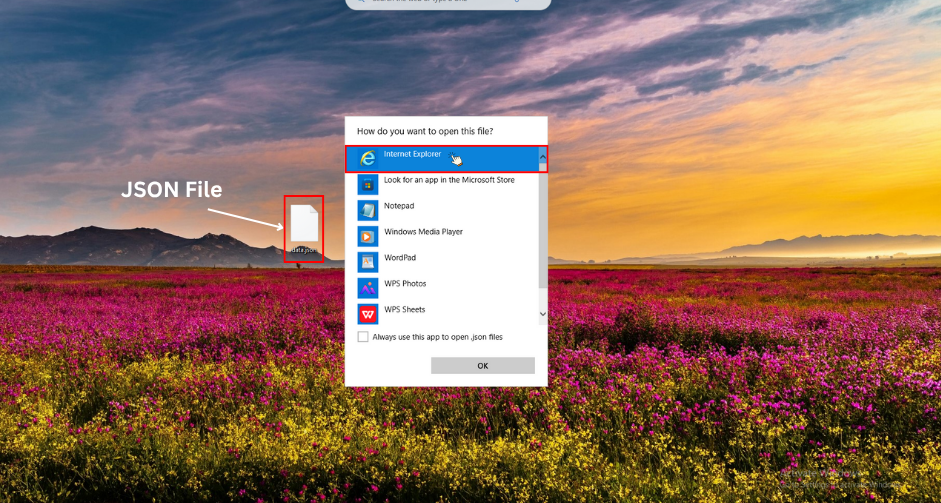
- Drag and drop: Open your browser (Chrome, Firefox, Edge, etc.), then drag the JSON file from your file explorer into the browser window.
- Or use the file URL: Type file:///path/to/your/file.json in the address bar (replace with the actual path).
- Enhance with extensions: For better readability, in Chrome/Firefox, add a JSON Viewer or JSON Formatter as an extension. These automatically indent and colorize the JSON.
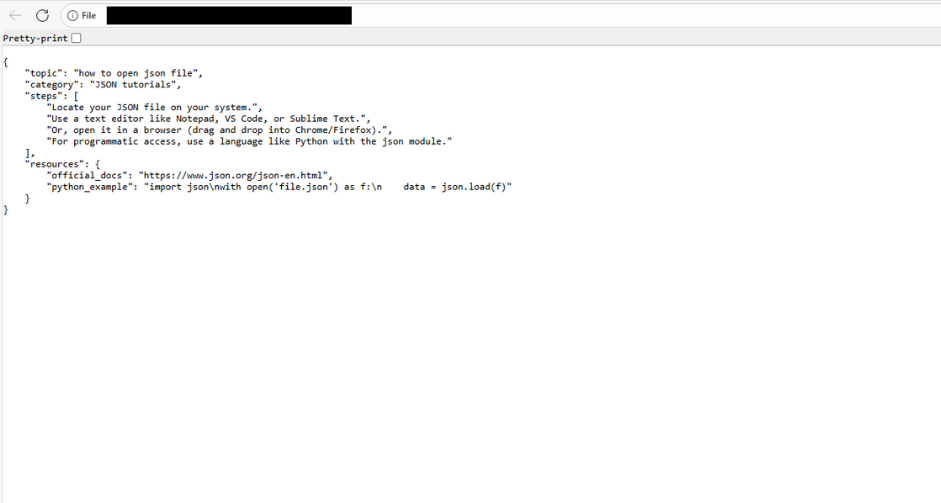
Note: Large files might be displayed in raw text or display errors due to large file size or security settings. In such cases, take a different approach.
Method 3: Using Online JSON Viewers
To use it without installing, an online tool would allow you to upload and read JSON files in a secure manner in your browser. This is ideal in case you are sharing a computer or have possibly malformed JSON.
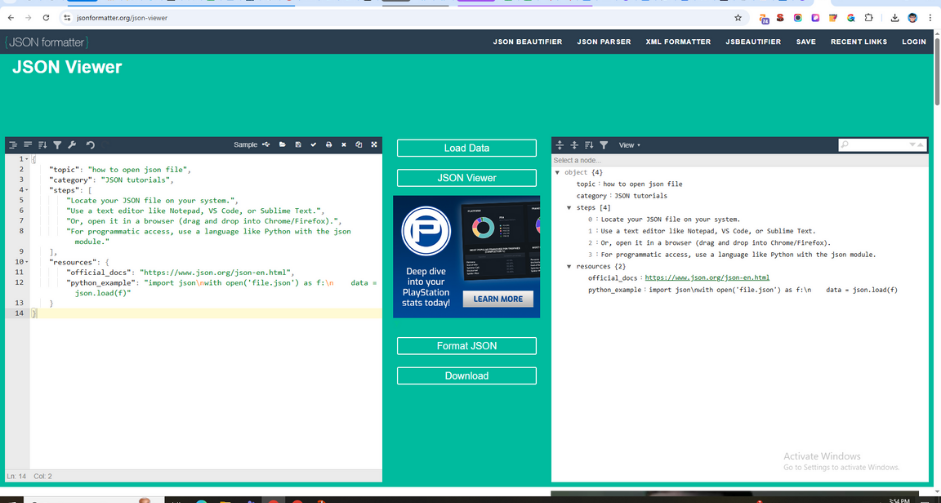
- Select a tool: Some popular tools are jsonformatter.org, jsonviewer.stack.hu, or codebeautify.org/jsonviewer.
- Upload your file: Visit the site, then on the bottom left-hand side, under the “Upload” button or “Choose File,” select your .json file.
- View and format: The tool will then decode the JSON data, present it in a tree view or in a formatted text, and, in many cases, will check it against errors. The formatted version is also copyable, editable, or downloadable.
Careful with sensitive information–visit trusted websites and do not post sensitive information.
Method 4: Programmatically (Using Python)
When you are a developer or have to manipulate a JSON object in code, it is preferable to open it in a programmatic manner. This is easy with Python and the built-in JSON module.
- Install Python: Python is not already installed; download it from python.org.
- Write a script: Launch a text editor or IDE and create a file such as read_json.py, which contains the following code:
# Replace 'yourfile.json' with your file path
import json

with open('yourfile.json', 'r') as file:
    data = json.load(file)

print(data)  # Or process the data as needed
- Run the script: Open a terminal/command prompt, navigate to the script’s directory, and run python read_json.py. The JSON data will load into a Python dictionary or list for manipulation.
This approach is ideal for automation, like parsing large datasets or integrating with other scripts.
Tips and Troubleshooting
- Test: When the JSON will not open, open it and check whether it is valid or not. Online validators can be used to verify syntax errors, such as missing commas or brackets.
- Big files: In the case of large JSON files (e.g., larger than 100MB), run jq (command-line) or special viewers to help avoid collapsing your editor.
- Security: Sometimes scripts may appear in JSON files; always check them against malware when a script is the source.
- Substitutes: In Linux, either cat or less can be used in the terminal, or an editor such as Vim/Nano.
It is not necessary to be scared of opening JSON files; in fact, learning how to open JSON file data is easier than you might think. You can work with any of the methods that fit your requirements, and soon you will be working with data like a pro.
Also Read
How to Solve JSON Decoder Error
How to Validate JSON
FAQs
Q1: What program opens a JSON file?
A JSON file can be opened with any text editor (like Notepad, Notepad++, Sublime Text, or VS Code) and specialized tools like Postman. Modern web browsers such as Chrome and Firefox also allow you to view JSON files.
Q2: How do I open a JSON file to PDF?
You can’t directly open JSON as a PDF. Instead, you need to first convert it. Tools like online JSON-to-PDF converters, Python scripts (using libraries like reportlab), or data visualization tools can export JSON data into a readable PDF format.
Q3: Can I open JSON in Excel?
Yes. Excel (2016 and later) has a built-in feature to import JSON files. Go to Data > Get Data > From File > From JSON, and Excel will load and format the JSON data into a table for analysis.
Q4: How do I access JSON data?
You can access JSON data by parsing it with programming languages like Python (json module), JavaScript (JSON.parse()), or by importing it into tools like Excel, Google Sheets, or APIs. In web development, JSON is most often used to exchange data between a client and a server.





Let's Start Your Project
Get free consultation for your digital product idea to turn it into reality!
Get Started