How to Identify Which Business Workflows Are Worth Automating with AI

TL;DR / Summary
Learn how to identify business workflows worth automating with AI. Use this practical framework to evaluate ROI, reduce manual work, and prioritize automation projects.
Table of Contents
- What Makes a Business Workflow Ready for AI Automation?
- The Workflow Scoring Matrix: Rules vs. AI Capabilities
- Which Business Workflows Deliver the Highest AI ROI First?
- 1. Customer Support and Ticket Routing
- 2. Document Processing and Invoice Extraction
- 3. Sales Lead Enrichment and Inbound Qualification
- 4. Internal Knowledge Retrieval and Onboarding
- How to Calculate the True Cost and Value of Automating a Workflow
- What Are the Biggest Risks When Automating Business Workflows with AI?
- Step-by-Step Framework to Audit and Select Your First AI Workflow
- Step 1: List Your Team's Repetitive Tasks
- Step 2: Score Workflows by Impact and Ease
- Step 3: Define Success Metrics and Guardrails
- Step 4: Build a Thin Prototype
- Step 5: Measure Results and Expand
- Key Takeaways
- FAQs
- 1. How do I know if a process needs AI or simple automation?
- 2. What is the typical timeline to build a custom AI workflow?
- 3. Will AI automation replace our operational staff?
- 4. How do we prevent AI models from making mistakes or hallucinating?
- 5. Is customer data safe when used in AI workflows?
- 6. What is a human-in-the-loop workflow?
- 7. How do we calculate the ROI of an AI workflow project?
- Conclusion
Most operations leaders don't lack ideas for AI projects; they lack a way to tell which ones are actually worth building. Not every manual process needs a model behind it, and picking the wrong one wastes budget and erodes trust in the system before it proves its value.
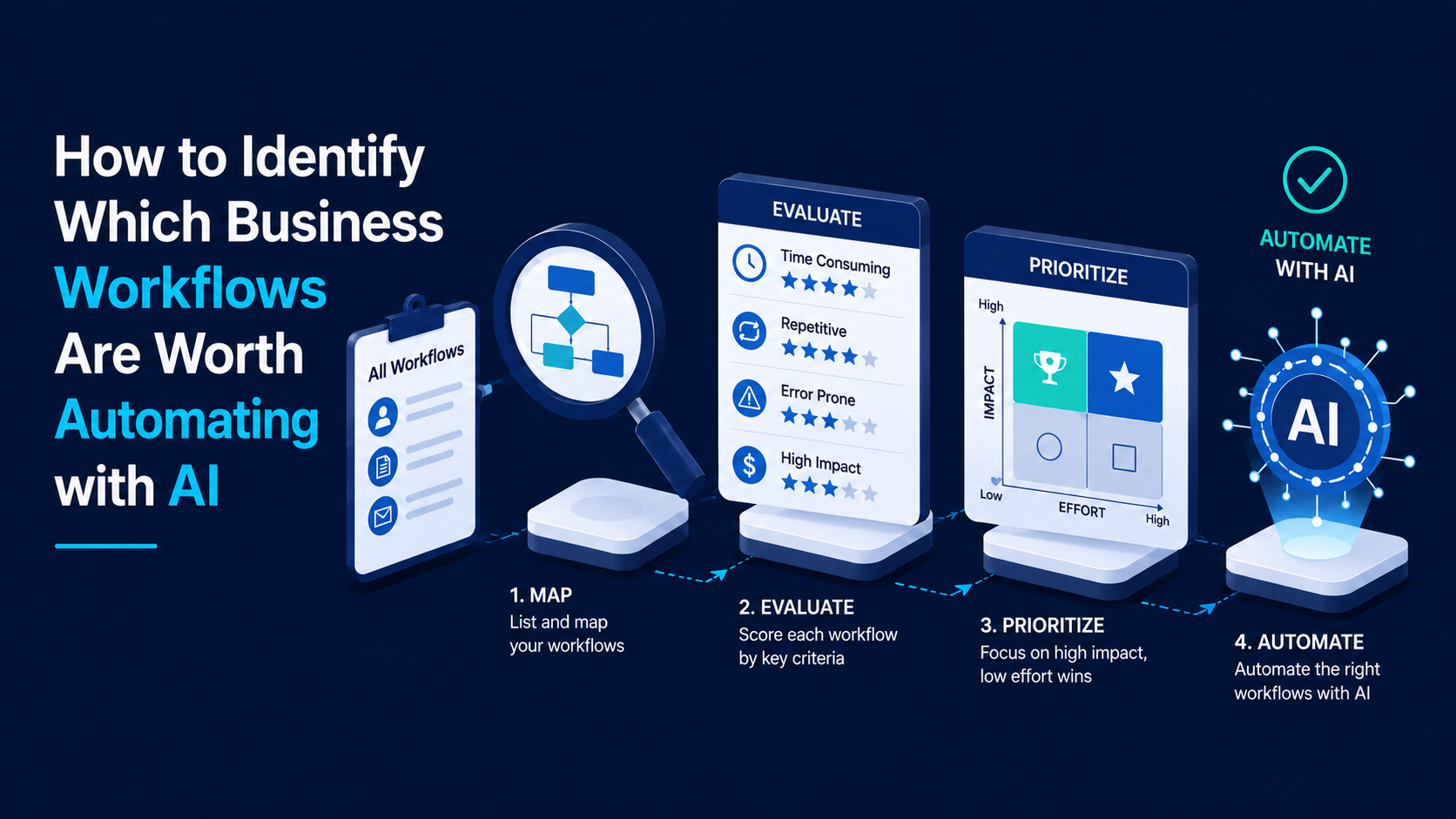
To identify which business workflows are worth automating with AI, look for processes with high volume, unstructured data, repetitive manual steps, and clear business impact. The best candidate workflows require human reasoning like summarizing, extracting, or categorizing text, but do not require complex strategic judgment. Automating these workflows yields fast returns without breaking existing operations.
What Makes a Business Workflow Ready for AI Automation?
A business workflow is ready for AI automation when it relies on unstructured information such as emails, PDFs, or freeform notes while still following predictable operational steps. Traditional automation handles fixed rules well, while artificial intelligence handles variable text and patterns.
When choosing a workflow for AI automation (using software models to handle language, images, or unstructured tasks), you must look at four basic characteristics:
High repetition: The task happens dozens or hundreds of times every week.
Unstructured data: Information arrives as raw text, scanned files, customer messages, or voice transcripts rather than neat database fields.
Clear inputs and outputs: The starting material and the required result are easily defined, even if the steps between them vary slightly.
Tolerance for human review: The process allows for a human-in-the-loop (HITL) setup (a workflow design where a person checks or approves AI outputs before final action) during early rollout.
Many teams make the mistake of trying to automate complex, creative tasks first. In reality, the quiet, repetitive administrative tasks yield the fastest returns. If a process relies on a deterministic workflow (a fixed sequence in which the same input always produces the same output), simple code or basic tools like Zapier or Make might be enough. If the task requires understanding context, summarizing long threads, or pulling key facts from messy documents, an LLM (Large Language Model), an AI system trained to process, analyze, and generate human language, is the right tool for the job.
The Workflow Scoring Matrix: Rules vs. AI Capabilities
Not every manual process requires artificial intelligence. Choosing the wrong tool leads to wasted development budgets and fragile systems.
To pick the right approach, compare your workflow against three operational models:
Operational Need | Rule-Based Automation | AI Workflow Automation | Manual Human Processing |
Data Format | Neat fields, spreadsheets, JSON | Messy PDFs, emails, transcripts | Highly ambiguous, incomplete data |
Decision Logic | Strict "if-this-then-that" rules | Pattern matching and context review | Deep strategy or emotional empathy |
Error Tolerance | Zero tolerance for logic shifts | High accuracy with human checks | High, but prone to fatigue errors |
Best Tooling | Python scripts, n8n, Make | Custom LLM pipelines, RAG | In-house operations team |
Setup Speed | Very fast (hours to days) | Fast (1 to 3 weeks) | Slow (requires ongoing hiring) |
Which Business Workflows Deliver the Highest AI ROI First?
The highest return on investment comes from operational bottlenecks where skilled employees waste hours moving text between systems.
Here are the four business areas where AI workflows deliver the most value:
1. Customer Support and Ticket Routing
Support teams lose hours triaging tickets, writing repetitive replies, and looking up account details in systems like Salesforce or Jira. An AI layer can read incoming messages, detect sentiment, tag issues, pull customer history, and draft a response for a human agent to review.
2. Document Processing and Invoice Extraction
Operations teams frequently process invoices, receipts, and vendor agreements. Standard software breaks when a vendor changes a PDF layout. AI models read documents like a human does, pulling out key figures, line items, and approval terms regardless of layout.
3. Sales Lead Enrichment and Inbound Qualification
Sales reps often spend more time researching prospects than talking to them. An automated AI pipeline can scrape incoming lead websites, read news updates, summarize recent company changes, and draft customized outreach notes directly inside your CRM.
4. Internal Knowledge Retrieval and Onboarding
Employees waste significant time asking colleagues where to find company policies or technical specs. Building an internal search tool lets team members query internal documents in plain English and get instant, cited answers.
Most teams underestimate the hidden cost of context switching until it costs them a full sprint. When experts spend half their day on data entry, product delivery slows down across the entire company.
How to Calculate the True Cost and Value of Automating a Workflow
To calculate the true value of automating a workflow, measure the direct hours saved, the cost of human error, and the speed gain for your business.
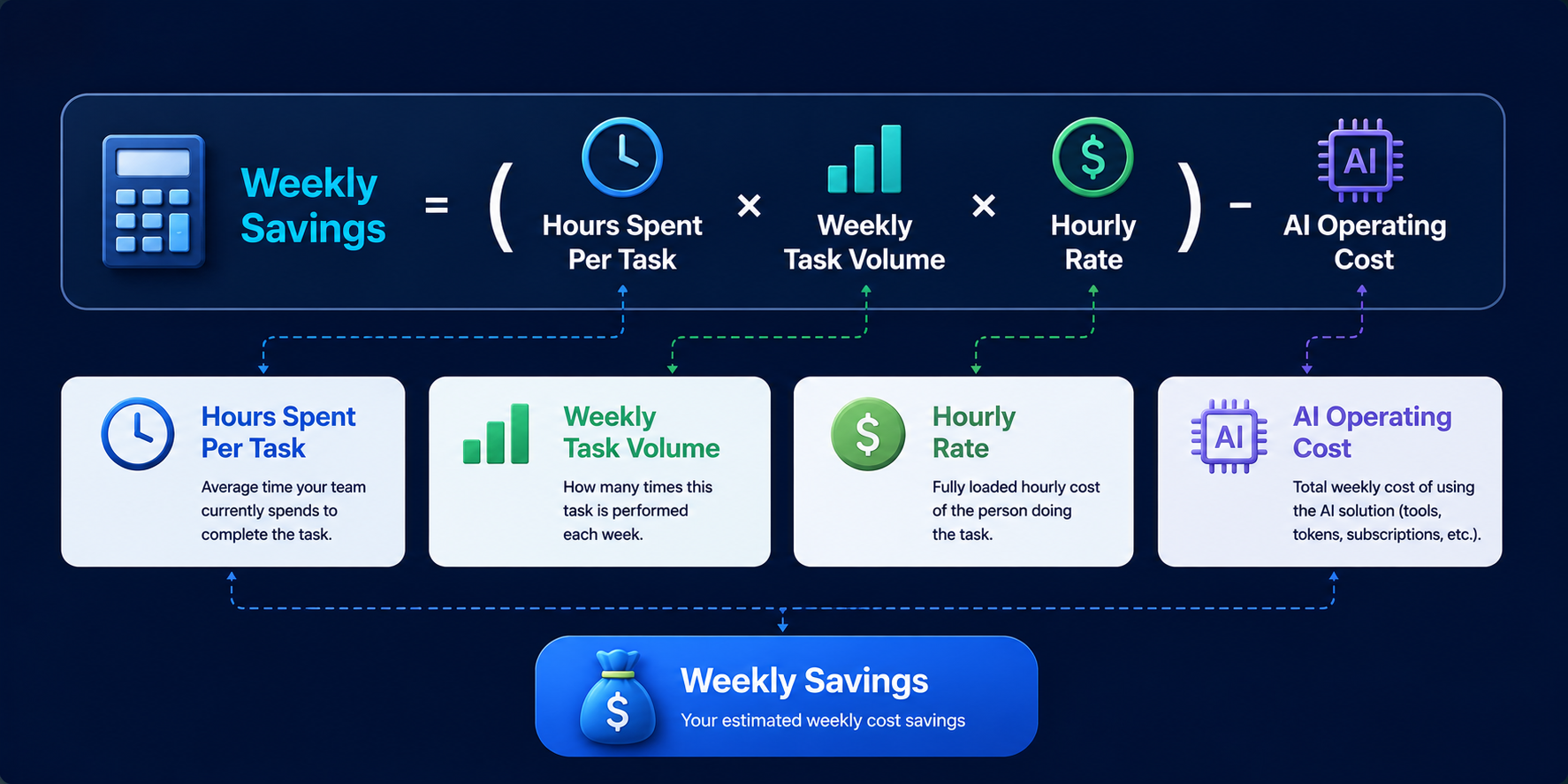
For example, if three operations managers spend 10 hours each week processing vendor forms at an average cost of $50 per hour, that process costs $1,500 every week. If an AI pipeline reduces that effort by 80% and costs $100 per month to run, the net savings exceed $5,000 every month.
Beyond direct labor costs, factor in these secondary gains:
Error reduction: Manual data entry carries an average error rate of 1% to 4%. Correcting those errors late in a process costs far more than preventing them.
Execution speed: Processing a vendor document in 30 seconds instead of two business days keeps your operations moving smoothly.
Employee retention: High-performing workers stay longer when you remove mind-numbing copy-paste work from their day.
What Are the Biggest Risks When Automating Business Workflows with AI?
The biggest risks in AI workflow automation are model hallucinations, security gaps, and fragile system integrations. Knowing these risks allows you to design safe systems from day one.
When building AI workflows, watch out for these three core pitfalls:
Hallucinations: AI models can sometimes generate plausible but incorrect facts. Prevent this by using RAG (Retrieval-Augmented Generation), a technique that grounds AI outputs in verified private documents, so the model only uses your exact business records.
Data privacy issues: Sending sensitive customer data to public AI tools without governance creates serious compliance risks. Always use private enterprise endpoints or secure cloud setups.
Process breakdown: If an upstream software updates its API, an unmonitored pipeline can fail silently. Build clear error logging and alerts into your workflows.
In our experience, shipping an AI workflow without proper verification steps is the fastest way to break user trust. Always start with human review until the system proves its accuracy over time.
Step-by-Step Framework to Audit and Select Your First AI Workflow
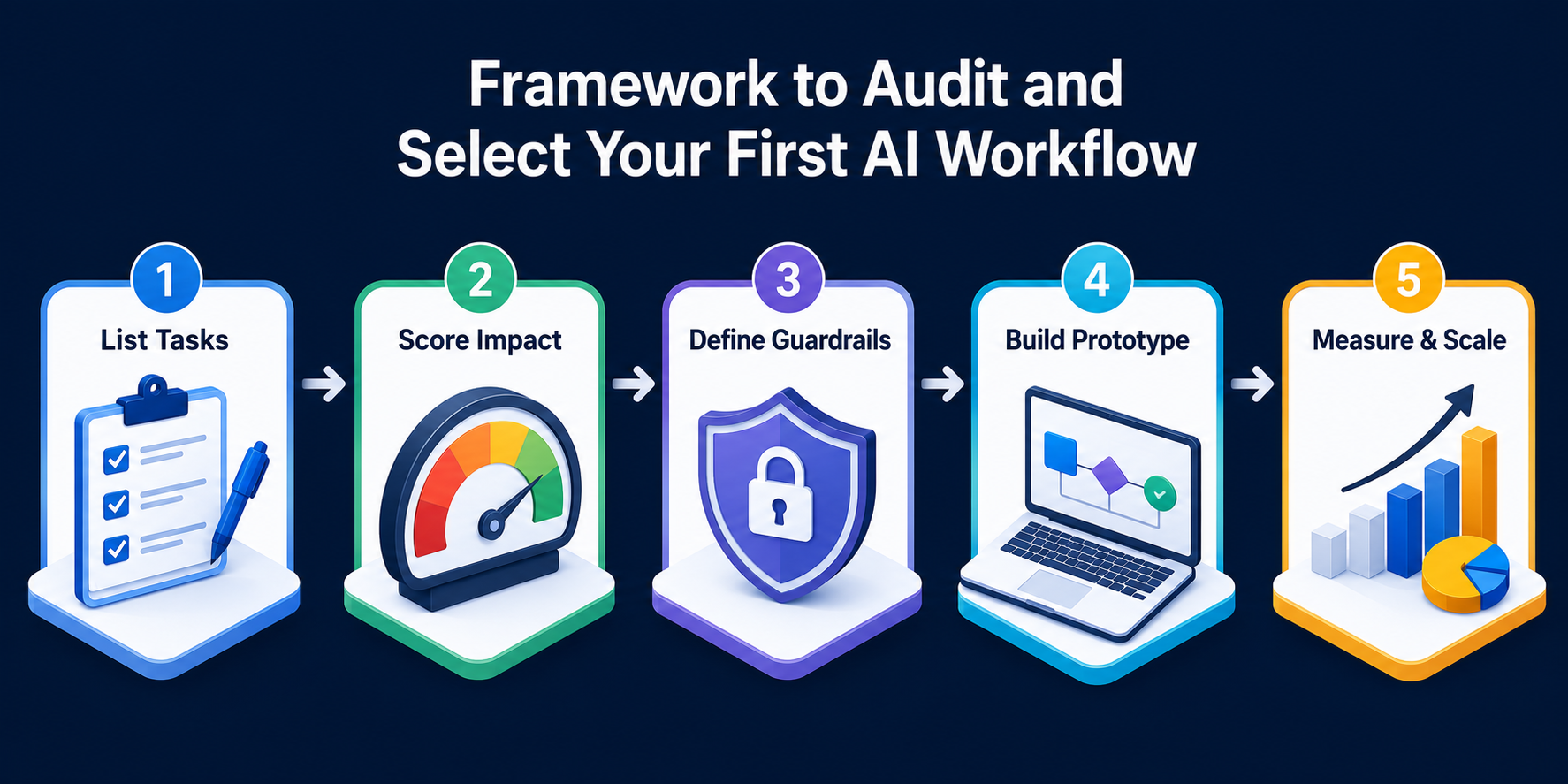
Selecting your first workflow requires a structured approach. Follow these five steps to find and launch your highest-value automation project:
Step 1: List Your Team's Repetitive Tasks
Ask every team lead to track tasks that take more than three hours per week and involve reading, writing, or sorting information.
Step 2: Score Workflows by Impact and Ease
Plot your tasks on a grid evaluating business impact against technical complexity. Choose a workflow with high daily volume but low regulatory risk for your first build.
Step 3: Define Success Metrics and Guardrails
Set clear benchmarks before writing code. Decide what accuracy rate you need (e.g., 95% extraction accuracy) and define human review checkpoints.
Step 4: Build a Thin Prototype
Create a simple working prototype using toolkits like n8n or custom Python code connected to an LLM provider. Test it on 50 real past examples to check quality.
Step 5: Measure Results and Expand
Deploy the tool to a small team. Monitor time saved, track error rates, collect user feedback, and refine your prompts before rolling it out company-wide.
Key Takeaways
Focus on unstructured text: The best AI workflows involve messy text like emails, PDFs, and tickets that rule-based systems cannot handle.
Keep humans in the loop: Start every AI workflow with a human review step to maintain quality and build internal trust.
Calculate full ROI: Factor in speed gains, error reduction, and employee satisfaction alongside direct hours saved.
Ground your data: Use retrieval systems like RAG to keep AI answers accurate and prevent hallucinations.
Start small: Pick one high-repetition, low-risk process first, prove its value, and then expand across other operations.
FAQs
1. How do I know if a process needs AI or simple automation?
If your process follows strict "if-this-then-that" rules with clean, structured data, use standard software or simple rule-based automation. If the process requires reading unstructured text, understanding context, or handling variable document formats, use AI automation.
2. What is the typical timeline to build a custom AI workflow?
A focused AI automation project usually takes two to four weeks. This includes auditing the process, setting up secure data connections, building human review workflows, and testing accuracy against real data.
3. Will AI automation replace our operational staff?
No. Effective AI workflows remove repetitive data entry and manual processing tasks. This allows your operational staff to focus on complex problem-solving, vendor management, and high-value customer service.
4. How do we prevent AI models from making mistakes or hallucinating?
You can prevent errors by using Retrieval-Augmented Generation (RAG) to limit the AI model to verified company sources. Adding human approval steps for critical actions also ensures full control over final outputs.
5. Is customer data safe when used in AI workflows?
Yes, provided you use enterprise-grade API connections with strict data privacy terms. Enterprise setups ensure your business data is encrypted and never used to train public AI models.
6. What is a human-in-the-loop workflow?
A human-in-the-loop workflow is an automated process where an AI performs the initial data extraction, drafting, or analysis, but a human employee reviews and approves the work before final submission.
7. How do we calculate the ROI of an AI workflow project?
Calculate ROI by multiplying the hours saved per week by team members' hourly rates, then add saved costs from reduced error rates. Subtract the initial development cost and monthly infrastructure fees to determine net returns.
Conclusion
If your team is losing hours to manual data entry, unstructured document processing, or repetitive routing, you do not need to guess which tools to build. Start by identifying the processes that consume the most time, involve repetitive decision-making, and offer measurable business value. With the right strategy, AI can improve efficiency, reduce operational costs, and free your team to focus on higher-impact work. Our AI consulting and automation team helps you identify bottlenecks, calculate expected returns, and build secure workflows tailored to your business goals.
Your Product Could Be the
Next Case Study
Explore what we’ve built — and let’s collaborate to create something impactful for your business.
We reply within 24 business hours.